Make AI videos in bulk,
keep the same character
Paste a whole list of prompts and run several Muse accounts at once. Type @name and the character photo is attached to every video.
3-day free trial, every feature · Then $29/month
When a video finishes, that lane picks up the next prompt automatically until the queue is empty.
Every video is the same loop.
You bring the ideas, the machine does the waiting.
Paste the whole list once. As many accounts online, as many videos running at the same time.
From a prompt list to MP4 files.
Add your accounts and character photos once. After that, every batch is just 3 steps.
Paste your whole prompt list
One line = one video. Type @ to attach a character photo. Pick 5, 10 or 15 seconds, 9:16, 16:9 or 1:1.
@luna reviews lipstick in front of a mirror
@kai unboxes headphones on a wooden desk
@mia shows off a printed t-shirt
Splits work across accounts in parallel
Failed videos retry automatically. If an account drops its session, the video moves to another account.
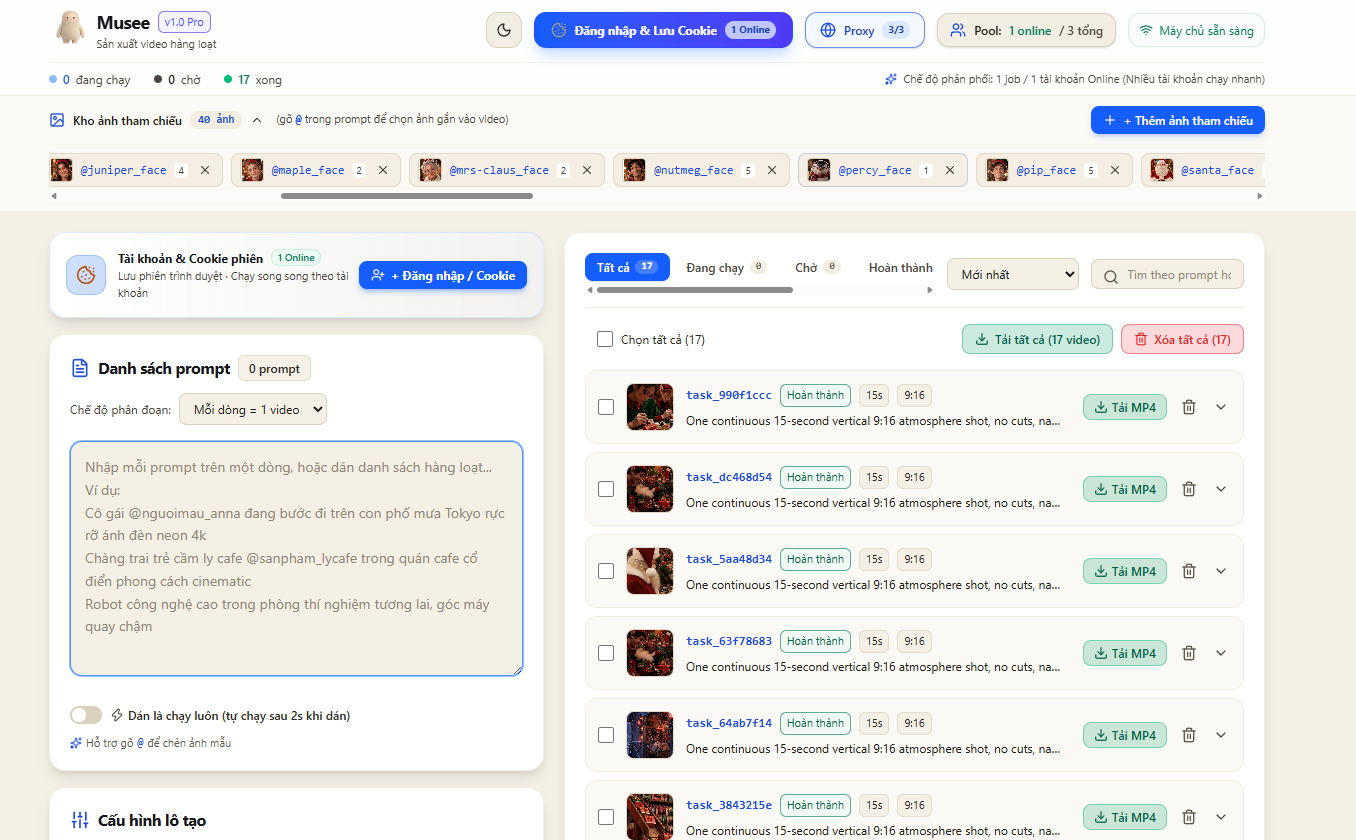
task_990f1cccRunning 62%task_dc468d54Running 18%task_5aa48d34WaitingPreview in the list, download what you like
Click a thumbnail and the video plays. Download MP4s one by one, or all at once.
task_63f78683 · 15sDonetask_64ab7f14 · 15sDone17 videosDownload allType @name, the character photo attaches itself.
The box below works just like the app. Edit prompts, add lines, or type a name that isn't in the library to see Musee warn you.
Each line = 1 video
0 promptsUpload once, use in every video
One photo and one name per character. Any prompt that calls that name uses that exact face.
Illustrative cartoon characters (Avataaars by Pablo Stanley, via DiceBear, free for commercial use). In the app you use your own character photos and can add many at once.
Enough to leave it running without babysitting.
True multi-threading
Each online account is one lane. Set the number of lanes right in the settings.
Consistent characters with @tags
Prompts with @name send the photo automatically. Unknown names are flagged red right away, so nothing runs without its image.
Dropped account, no lost video
If an account loses its session or runs out of quota, running videos move to another account.
Auto-retry on errors
Failed videos retry twice. Videos stuck for over 15 minutes are released and run again.
Paste and it runs
Turn this on, paste prompts, and 2 seconds later they're in the queue. With an undo button.
Preview before download
Finished videos play right in the list. No need to download to see if they're good.
Proxy per account
Attach a rotating or static proxy to each account, with an IP rotate button.
Encrypted cookies
Sessions are stored AES-256-GCM encrypted on your own computer and never shown again in the interface.
Drag-and-drop Flow Studio
Each card is one image with its own prompt. Arrange freely on the canvas, then click "Create all".
Try it free for 3 days. Pay only if you love it.
Unlimited accounts · Unlimited videos
- Run many accounts in parallel
- Character library with @tag photos
- Sign in with login, cookie or password
- Rotating / static proxy per account
- Auto-retry on errors, no lost videos
- Flow Studio: drag images into videos
- Preview, download MP4s one by one or all at once
Frequently asked questions
Does Musee generate videos for free?
No. Musee uses your own Muse accounts and their quotas. It lets you run several accounts at once and automates the repetitive steps.
How many accounts do I need?
One account works fine, videos just run one after another. With 3 accounts online, 3 videos run at the same time. Musee shows which accounts still have quota and which are used up.
How do characters stay consistent?
Upload a character photo to the library and give it a name, for example @luna. Any prompt with that name automatically attaches the photo. The final likeness depends on Muse's image reference quality.
Is pasting my cookie safe?
Cookies and login details are encrypted with AES-256-GCM and stored only on your computer. Musee never shows them again in the interface or in logs.
Will my accounts get banned?
Musee respects Muse's limits: when it hits a rate limit, it slows down and retries instead of flooding requests. Account policy is up to Muse, so please follow Muse's terms.
Will it run on my computer?
Musee runs on Windows and Mac, with the interface in your browser. Videos are rendered on Muse's servers, so you don't need a powerful graphics card.
What happens after the 3-day trial?
The app pauses and shows a renew button for $29/month. Pay by card, 30 days are added automatically, then click "Check again" in the app to continue. All your data stays intact.
 Start today
Let the machine do the waiting.
You bring the ideas.
Download Musee, open the app and sign in with Google to use every feature free for the first 3 days.
Download freeAfter 3 days: $29/month · Pay by card to unlock